SQL SERVER INSTALLATION INTERNALS
Installing Microsoft SQL Server is often treated as a routine DBA task : launch the installer, click Next a few times and wait for the green checkmark. But under the hood, SQL Server setup performs a carefully controlled sequence of validations, configurations and registrations that determine how stable, secure and performant your instance will be in production.
This article walks through the internal workflow of SQL Server installation, explaining what actually happens from the moment you run setup.exe to the point where the instance is ready to accept connections.
Setup Initialization: The Bootstrapper Phase
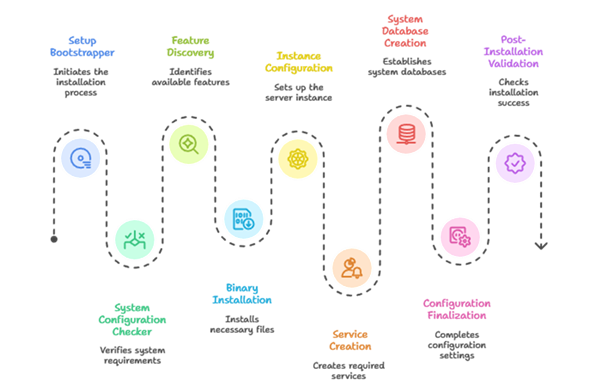
The SQL Server installation process begins with a setup bootstrapper. This component does not install SQL Server itself, instead it prepares the environment for installation.
At this stage, setup:
● Validates the installation media
● Extracts required files to a temporary working directory
● Loads the SQL Server Setup Engine
● Scans the system for existing SQL Server components
● Determines whether the operation is a fresh install, upgrade, or add-feature scenario
No binaries are copied yet. If setup fails here, the issue is usually related to unsupported operating systems, corrupted media or missing prerequisites.
System Configuration Checker (SCC)
Before any real work begins, SQL Server runs the System Configuration Checker. This is a rule-based validation engine that ensures the operating system is ready to host SQL Server.
Some of the key checks include:
● OS version and patch level
● Required Windows updates
● .NET Framework availability
● Disk space and file system compatibility
● Pending reboot status
● Network and firewall readiness
Each rule returns a status: Passed, Warning, or Failed.
A single failure is enough to stop the installation. It prevents unstable or unsupported deployments before they reach production.
Feature Discovery and Dependency Resolution
Once the environment passes validation, setup analyses the features selected for installation.
For example:
● Database Engine Services
● SQL Server Agent
● Full-Text Search
● Integration Services
● Client connectivity components
Internally, setup:
● Resolves feature dependencies
● Identifies shared vs instance-specific components
● Builds an execution plan that determines the order of installation
This dependency resolution is why SQL Server uses the same setup process whether you are installing fresh or adding features later.
Binary Installation
This is the point most people associate with “installation,” but it’s only one part of the overall process.
During binary installation:
● SQL Server engine binaries are copied to disk
● DLLs and system libraries are registered
● Shared components are installed if required
● Registry entries for installed components are created
At this stage, SQL Server services still do not exist, and no databases have been created. The engine cannot start yet.
Instance Configuration
SQL Server now moves into instance-level configuration.
This step determines:
● Whether the instance is default (MSSQLSERVER) or named
● The instance ID
● Instance-specific registry paths
● Logical separation from other SQL Server instances on the same host
This design allows multiple SQL Server instances to coexist without interfering with each other, each maintaining its own configuration and metadata.
Service Creation and Security Setup
Next, SQL Server creates its Windows services.
Depending on selected features, these may include:
● SQL Server Database Engine
● SQL Server Agent
● SQL Server Browser
● Full-Text Filter Daemon
Internally, setup:
● Registers Windows services
● Validates service accounts
● Grants required permissions to data, log, and registry locations
● Configures service startup behavior
System Database Creation
This is one of the most critical phases of setup.
SQL Server creates:
● master
● model
● msdb
● tempdb
During this process:
● Data and log files are initialized
● Metadata structures are built
● Core system objects are created
● The transaction log framework is established
If this step fails, SQL Server will not start—even if everything before it succeeded.
Configuration Finalization
Once system databases exist, SQL Server applies core configuration choices made during setup, including:
● Server collation
● Authentication mode (Windows or Mixed)
● Initial sysadmin assignments
● Hardware detection for CPU and memory
Post-Installation Validation and Cleanup
In the final stage, setup:
● Starts SQL Server services
● Performs basic health checks
● Writes detailed installation logs
● Cleans up temporary setup files
● Registers the instance as successfully installed
All installation activity is logged in the Setup Bootstrap log directory. These logs are invaluable when diagnosing failed or partially completed installations.
Why Installation Internals Matter to a DBA
Understanding SQL Server installation internals helps DBAs:
● Troubleshoot failed setups quickly
● Standardize environments across servers
● Make informed decisions about security and performance
● Avoid configuration choices that are difficult to reverse
Conclusion:
Installation is not just a starting point, it defines the foundation of the SQL Server environment.
SQL Server setup is a carefully engineered, multi-phase process designed to ensure stability, security, and consistency. From pre-installation checks to system database creation, every step follows a defined order with clear dependencies.
For DBAs, understanding what happens during setup turns installation from a routine task into a controlled and predictable operation and that knowledge pays dividends throughout the life of the server.
Author : Venkat Vinod Kumar Siram
LinkedIn : https://www.linkedin.com/in/vinodsiram/
Thank you for giving your valuable time to read the above information. Please click here to subscribe for further updates.
KTExperts is always active on social media platforms.
Facebook : https://www.facebook.com/ktexperts
LinkedIn : https://www.linkedin.com/company/ktexperts/
Twitter : https://twitter.com/ktexpertsadmin
YouTube : https://www.youtube.com/c/ktexperts
Instagram : https://www.instagram.com/knowledgesharingplatform
Note: Please test scripts in Non Prod before trying in Production.

 Loading...