Protected: Shell Script to get EMAIL alerts for ABENDED PROCESSES in Oracle GoldenGate
There is no excerpt because this is a protected post.

There is no excerpt because this is a protected post.
TOP SQL’s In this article,we will get notified for TOP SQL’s ORDERED BY ELAPSED TIME Step 1 : Create temporary tables to store TOP SQL’s
|
1 2 3 4 5 |
SYS>>CREATE TABLE dbmon.TOP_ELAPSEDTIME_SQLIDS ( SQL_ID VARCHAR2(20 CHAR), LASTMODIFIEDDATE DATE DEFAULT SYSDATE NOT NULL ); |
Another table to store ALL SQL’s.
|
1 2 3 4 5 |
SYS>>CREATE TABLE dbmon.ALL_ELAPSEDTIME_SQLIDS ( SQL_ID VARCHAR2(20 CHAR), LASTMODIFIEDDATE DATE DEFAULT SYSDATE NOT NULL ); |
Step 2 : Create the below scripts to capture TOP SQL’s in tables… Read More
There is no excerpt because this is a protected post.
Oracle :Batch updates using PLSQL Blocks. In this article , we will learn how to update million records in a table using plsql blocks. Aim : To avoid Undo errors –> For every 200 transactions we are keeping commit to avoid snapshot too old error.… Read More
There is no excerpt because this is a protected post.
Oracle:HEALTH CHECK REPORT(Capturing Archive information). In this article we will implement to capture the Archive information using Shell script. Lets create a table which can store Archive information. Connect to SYS user and execute below statement.
|
1 2 3 4 5 6 7 8 9 10 11 12 13 14 15 16 17 18 19 20 21 22 23 24 25 26 27 28 |
CREATE TABLE DBMON.ARCHIVE_USAGE_HISTORY ( GENERATION_DATE DATE NOT NULL, INST_ID NUMBER NOT NULL, TOTAL_DAY_GB NUMBER ) TABLESPACE DATA01 RESULT_CACHE (MODE DEFAULT) PCTUSED 0 PCTFREE 10 INITRANS 1 MAXTRANS 255 STORAGE ( INITIAL 64K NEXT 1M MAXSIZE UNLIMITED MINEXTENTS 1 MAXEXTENTS UNLIMITED PCTINCREASE 0 BUFFER_POOL DEFAULT FLASH_CACHE DEFAULT CELL_FLASH_CACHE DEFAULT ) LOGGING NOCOMPRESS NOCACHE NOPARALLEL MONITORING; |
Create unique index and primary key on ARCHIVE_USAGE_HISTORY… Read More
Dear Readers, In this article, we will see the following Multiple Indexes On the Same Set Of Column in Oracle 12c. You can create multiple indexes on the same set of columns but only one of the indexes can be visible at a time and… Read More
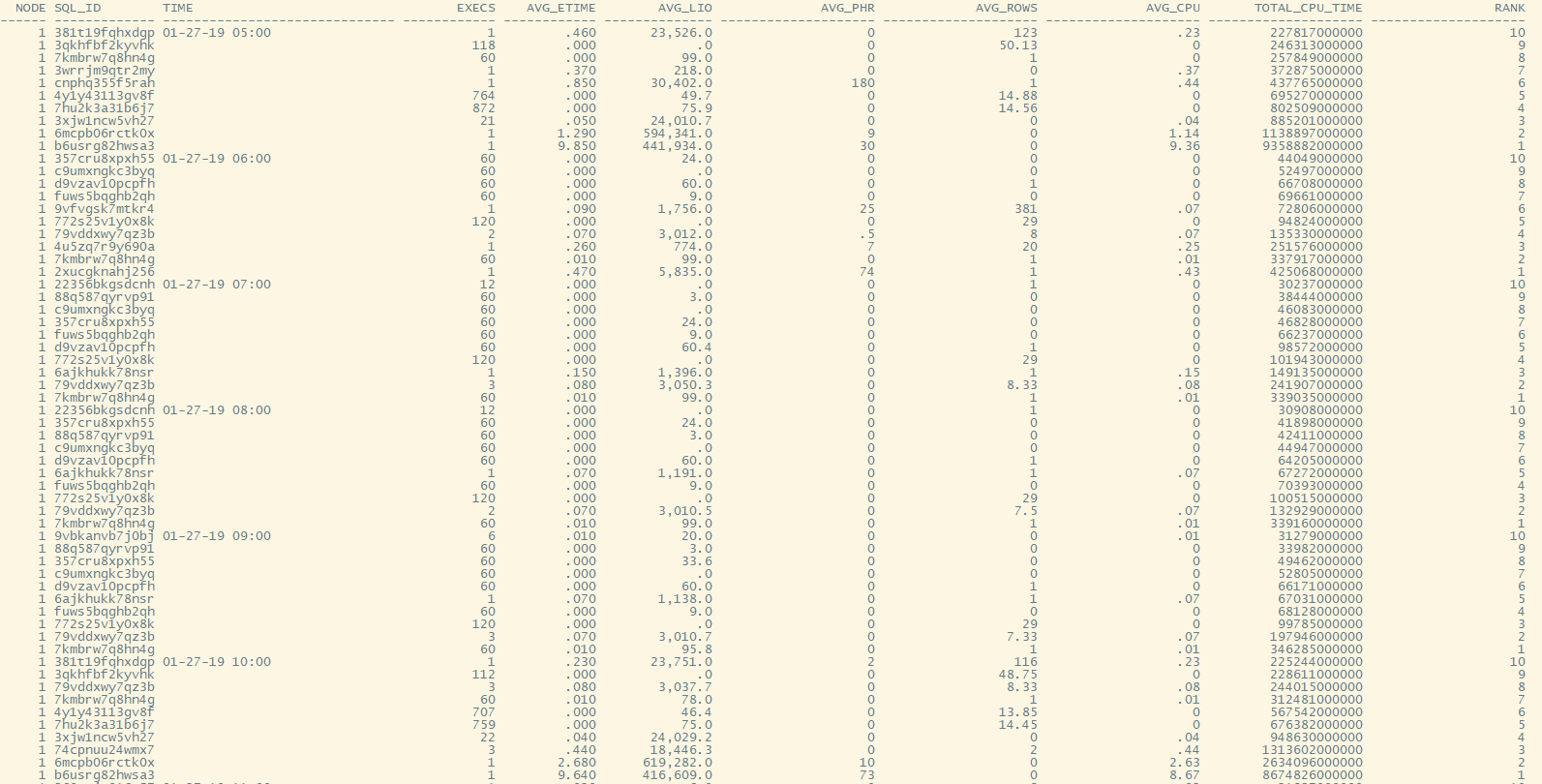
Oracle :How to find Historical TOP SQL’s. In this article we will see how to find out historical TOP SQL’s. The SQL Query to find Historical Top SQL’s.
|
1 2 3 4 5 6 7 8 9 10 11 12 13 14 15 16 17 18 19 20 21 22 23 24 25 26 27 28 29 30 31 32 33 34 35 36 37 |
set lines 235 set numwidth 20 set pages 3000 col execs for 999,999,999 col avg_etime for 999,999.999 col avg_lio for 999,999,999.9 col begin_interval_time for a30 col node for 99999 set feedback off break on plan_hash_value on startup_time skip 1 break on plan_hash_value on TIME break on TIME col time for a30 select * from ( select ss.instance_number node,sql_id, to_Char(begin_interval_time,'MM-DD-YY HH24:MI') Time, sum(nvl(executions_delta,0)) execs, round(sum((elapsed_time_delta/decode(nvl(executions_delta,0),0,1,executions_delta))/1000000 ),2) avg_etime, round(sum((buffer_gets_delta/decode(nvl(buffer_gets_delta,0),0,1,executions_delta))),2) AVG_LIO, round(sum((DISK_READS_DELTA/decode(nvl(DISK_READS_DELTA,0),0,1,executions_delta))),2) AVG_PHR , round(sum((ROWS_PROCESSED_DELTA/decode(nvl(ROWS_PROCESSED_DELTA,0),0,1,executions_delta))),2) AVG_ROWS , round(sum((CPU_TIME_DELTA/decode(nvl(CPU_TIME_DELTA,0),0,1,executions_delta))/1000000),2) AVG_CPU, round(sum(CPU_TIME_DELTA)/1000000,2) TOTAL_CPU_TIME, RANK() OVER (PARTITION BY to_Char(begin_interval_time,'MM-DD-YY HH24:MI') ORDER BY sum(CPU_TIME_DELTA)*1000000 desc ) RANK from DBA_HIST_SQLSTAT S, DBA_HIST_SNAPSHOT SS where ss.snap_id = S.snap_id and ss.snap_id > (select max(snap_id)-1000 from DBA_HIST_SNAPSHOT ) and ss.instance_number = S.instance_number and executions_delta > 0 and begin_interval_time between to_date('27-JAN-2019 04:20','DD-MON-YYYY HH24:MI') and to_date('31-JAN-2019 06:30','DD-MON-YYYY HH24:MI') group by ss.instance_number,sql_id, to_Char(begin_interval_time,'MM-DD-YY HH24:MI') order by to_Char(begin_interval_time, 'MM-DD-YY HH24:MI'),sum(CPU_TIME_DELTA)*1000000,sum((CPU_TIME_DELTA/decode(nvl(CPU_TIME_DELTA,0),0,1,executions_delta))/1000000) ) where RANK<=10; |
Output : In screenshot Output in Text Format :
|
1 2 3 4 5 6 7 8 9 10 11 12 13 14 15 16 17 18 19 20 21 22 23 24 25 26 27 28 29 30 31 32 |
NODE SQL_ID TIME EXECS AVG_ETIME AVG_LIO AVG_PHR AVG_ROWS AVG_CPU TOTAL_CPU_TIME RANK ------ ------------- ------------------------------ ------------ ------------ -------------- -------------------- -------------------- -------------------- -------------------- -------------------- 1 7kmbrw7q8hn4g 01-27-19 14:00 60 .010 78.0 0 1 .01 .32 10 1 3wrrjm9qtr2my 1 .390 482.0 0 2 .37 .37 9 1 4y1y43113gv8f 601 .000 50.6 0 15.18 0 .54 8 1 7hu2k3a31b6j7 614 .000 79.2 0 15.45 0 .57 7 1 6wrwqq7jkmv3w 1 .730 506.0 0 6 .72 .72 6 1 3xjw1ncw5vh27 21 .040 24,029.0 0 0 .04 .85 5 1 74cpnuu24wmx7 3 .470 18,446.3 0 2 .42 1.27 4 1 6mcpb06rctk0x 1 3.180 594,799.0 9 0 3.03 3.03 3 1 381t19fqhxdgp 1 5.180 28,698.0 2 75 5.07 5.07 2 1 b6usrg82hwsa3 1 11.360 314,544.0 22 0 11.21 11.21 1 1 39k4gf5t0831y 01-27-19 15:00 14 .000 10.4 0 0 0 .02 10 1 22356bkgsdcnh 12 .000 .0 0 1 0 .03 9 1 357cru8xpxh55 60 .000 3.0 0 0 0 .04 8 1 c9umxngkc3byq 60 .000 .0 0 0 0 .05 7 1 6ajkhukk78nsr 1 .060 1,156.0 0 1 .06 .06 6 1 d9vzav10pcpfh 60 .000 60.0 0 1 0 .06 5 1 fuws5bqghb2qh 60 .000 9.0 0 0 0 .07 4 1 772s25v1y0x8k 120 .000 .0 0 28 0 .1 3 1 79vddxwy7qz3b 3 .070 3,009.3 0 6.67 .07 .2 2 1 7kmbrw7q8hn4g 60 .010 78.0 0 1 .01 .32 1 1 2fh3rvu66aaqa 01-30-19 18:09 1 .210 369.0 11 1 .1 .1 10 1 7kmbrw7q8hn4g 11 .040 309.7 18.09 1 .01 .11 9 1 a6ygk0r9s5xuj 10 .010 71.5 1.2 0 .01 .12 8 1 02577v815yp77 1 .220 4,909.0 244 1 .13 .13 7 1 4phvdvx32a3mf 10 .020 162.4 3.3 1 .02 .18 6 1 bxywuzvtp6wjg 1 .400 4,753.0 166 0 .24 .24 5 1 3wrrjm9qtr2my 1 .840 1,232.0 56 2 .39 .39 4 1 644jqx2hk7qg0 1 .600 .0 0 1 .6 .6 3 1 12a2xbmwn5v6z 1 1.720 881,392.0 2643 3796 .71 .71 2 1 f6cz4n8y72xdc 1 2.510 914,468.0 2673 1 1.5 1.5 1 |
Comparing parameter files from two different databases. In this article we will learn how to compare two parameter files from two different databases. AIM : To make changes on orcl to look like prod we need to follow below procedure Source : Server name … Read More
There is no excerpt because this is a protected post.